728x90
반응형
기본 좌표
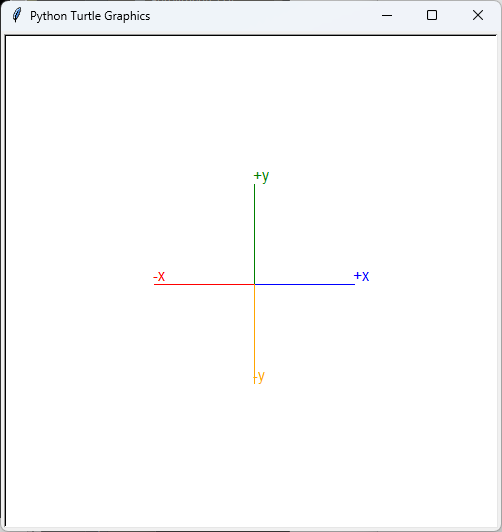
import turtle

# 화면 생성
screen = turtle.Screen()
screen.setup(500, 500)

# turtle 생성
t = turtle.Turtle()
t.hideturtle()

# 예제: 원 그리기
t.pencolor('blue')
t.forward(100)
t.write('+x', font=('Arial', 12, 'normal'))

t.setposition(0,0)
t.pencolor('red')
t.left(180)
t.forward(100)
t.write('-x', font=('Arial', 12, 'normal'))

t.setposition(0,0)
t.pencolor('green')
t.right(90)
t.forward(100)
t.write('+y', font=('Arial', 12, 'normal'))

t.setposition(0,0)
t.pencolor('orange')
t.left(180)
t.forward(100)
t.write('-y', font=('Arial', 12, 'normal'))

# 프로그램 종료
turtle.done()

try:
    turtle.bye()
except:
    print("bye")
화면 좌측 상단이 (0, 0)이 되도록 설정

import turtle

# 화면 생성
screen = turtle.Screen()
screen.setup(500, 500)

# 화면 좌측 상단이 (0, 0)이 되도록 설정
screen.setworldcoordinates(0, screen.window_height(), screen.window_width(), 0)

# turtle 생성
t = turtle.Turtle()
t.hideturtle()

# 예제: 원 그리기
t.pencolor('blue')
t.forward(100)
t.write('+x', font=('Arial', 12, 'normal'))

t.setposition(0,0)
t.pencolor('red')
t.left(180)
t.forward(100)
t.write('-x', font=('Arial', 12, 'normal'))

t.setposition(0,0)
t.pencolor('green')
t.right(90)
t.forward(100)
t.write('+y', font=('Arial', 12, 'normal'))

t.setposition(0,0)
t.pencolor('orange')
t.left(180)
t.forward(100)
t.write('-y', font=('Arial', 12, 'normal'))

# 프로그램 종료
turtle.done()

try:
    turtle.bye()
except:
    print("bye")
728x90
반응형
'프로그램' 카테고리의 다른 글
| [파이썬] CNN Stacked AutoEncoder 기반의 Time-series Denoising(노이즈 제거) (0) | 2023.07.18 |
|---|---|
| [AI] STABLE DOODLE (내가 그린 그림으로 그리기) (0) | 2023.07.17 |
| [파이썬] 문제 : 영단어 맞추기 (0) | 2023.07.13 |
| [파있선] 문제 : 엑셀 데이터를 정렬해서 chart 그리기 (5) | 2023.07.12 |
| [파이썬] 문제 : 2개의 엑셀 파일 읽어 비교하기 (openpyxl) (0) | 2023.07.12 |


댓글